_edited.png)
What is the Best Mac Repair Service for Pros?
- Jun 12
- 7 min read
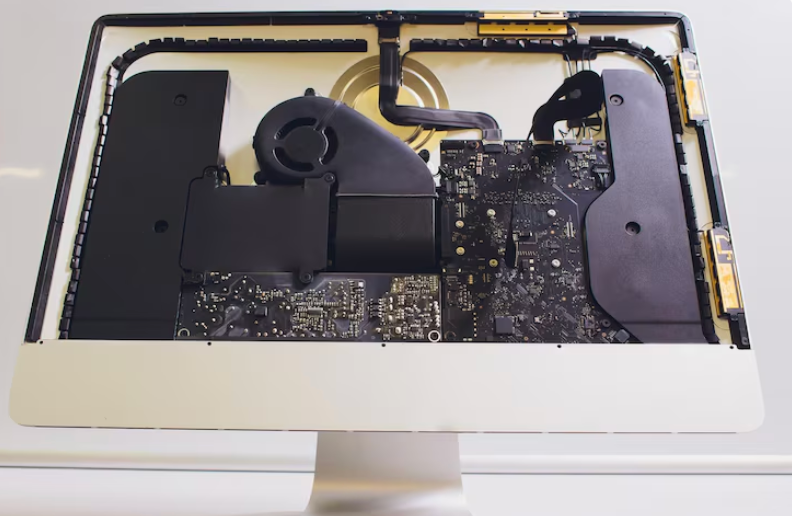
The sudden failure of your primary workstation is more than just a minor inconvenience; for a working professional, it represents a direct threat to your livelihood and project deadlines. We rely so heavily on our digital tools for creative production, financial management, and global communication that even an hour of downtime feels like an eternity. When the spinning beachball of death appears or the screen remains stubbornly dark, finding a reliable mac repair service becomes an absolute necessity for survival in the modern workforce.
Choosing the right technical partner ensures that your expensive investment is handled with the surgical precision it requires. By trusting dedicated specialists at YKL Mac Fix, you bypass the uncertainty of unverified kiosks and gain access to advanced diagnostic equipment. Professional restoration focuses on both the immediate fix and the long term stability of your machine, allowing you to return to your creative flow with complete confidence.
Navigating the landscape of hardware support in Malaysia requires a keen eye for transparency and technical depth. A professional workshop should feel like an extension of your own team, providing clear answers and swift action to protect your digital assets. Let us explore the essential criteria that define a top tier service for power users and how you can make the smartest choice for your hardware.
Evaluating Technical Expertise for Professional Results
When your career depends on a functioning computer, you cannot afford to settle for amateur guesswork. A professional mac repair requires an intimate understanding of microelectronics and the specific architectural nuances of premium hardware.
Identifying True Technical Mastery
The most reliable workshops are those that invest in specialised equipment such as infrared cameras for thermal imaging and high precision digital multimeters. These tools allow technicians to pinpoint a single failing capacitor on a complex logic board rather than suggesting an expensive replacement of the entire module. A true expert will proudly explain their diagnostic process at the front desk, offering a transparent view of the work required to save your machine.
If you are a photographer or video editor, you likely need a dedicated Mac screen repair that preserves colour accuracy and brightness levels. Professional clinics maintain strict quality controls to ensure that every panel installation meets original factory specifications. This level of detail is what separates a professional restoration from a simple cosmetic patch or a low quality aftermarket solution.
Avoiding the Pitfalls of Unverified Shops
Many users are tempted by low prices at shopping mall stalls, only to find their devices failing again within weeks. These shops often use salvaged components or low grade aftermarket parts that lack proper power regulation chips. This technical deficiency can lead to sudden voltage spikes that permanently fry your processor. By choosing a workshop that prioritises genuine parts, you ensure that your device remains compatible with future software updates and maintains its resale value.
Addressing Critical Hardware Failures Swiftly
Pros often push their machines to the limit, which can lead to specific hardware fatigue that requires immediate attention. Recognising these issues early is the key to preventing a total system collapse during a major project.
Dealing with Power and Thermal Issues
Heavy processing tasks generate significant internal heat, which can eventually degrade the thermal paste on your CPU or cause internal batteries to swell. If you notice your fans running at maximum speed during simple tasks or the chassis feeling unusually hot, it is time for a professional intervention. A failing battery is particularly dangerous as it can expand and put upward pressure on the delicate glass trackpad.
Top 3 benefits of a proactive battery restoration:
Prevent physical warping of the aluminium chassis and internal frame
Restore original portable runtime for working on the go
Protect the logic board from potential chemical leaks or electrical shorts
Monitoring Your System Health
Taking exceptional care of your current computing hardware requires actively monitoring its internal health statistics before things go wrong. Every modern laptop battery has a specific lifespan determined by how many full charging cycles it completes successfully. When a battery exceeds its maximum cycle count, it loses its ability to hold a proper charge and becomes highly susceptible to dangerous physical swelling.
To avoid costly secondary damage from a swollen power cell, you should check your own system health by following the official Apple battery cycle count guidelines provided online. By monitoring this specific number every few months, you can proactively schedule an affordable replacement long before the failing battery exerts enough physical pressure to break your delicate glass trackpad or bend your metal keyboard deck.
The Environmental and Career Value of Restoration
Deciding to fix your existing machine is a strategic choice that benefits both your professional bank account and the planet. Choosing restoration over replacement is a powerful statement for sustainable technology management.
Fostering Long Term Machine Reliability
A professionally restored computer often performs just as well as a brand new model once the internal bottlenecks are addressed. Upgrading your internal storage or refreshing the thermal cooling system can extend the usable life of your workstation by several years. This proactive approach ensures that your familiar software environment remains snappy and responsive, saving you the countless hours required to set up a brand new machine from scratch.
Maintaining your hardware through a trusted partner allows you to focus on your work rather than worrying about hardware glitches. Regular internal cleaning prevents dust buildup that causes thermal throttling, ensuring that your renders and exports finish on time every single day. Choosing to invest in your current tool is a smart way to manage your professional overhead while supporting a circular economy.
Rescuing Devices from Liquid Exposure
A morning coffee spill is a nightmare for any professional, but it does not have to be the end of your career. Liquid causes instant copper corrosion on the sensitive pathways of the motherboard, which can lead to permanent data loss if turned on prematurely. A professional workshop uses ultrasonic chemical baths to remove every trace of moisture and mineral deposits before they can cause lasting damage. Seeking a Mac water damage repair specialist immediately gives you the best chance of salvaging your work files and hardware.
Preparing Your Workstation for Professional Care
Before you hand over your professional tool to a technician, taking a few sensible precautions will protect your privacy and speed up the restoration process. Proper preparation ensures that the workshop team can focus entirely on the hardware fix without digital obstacles.
Securing Your Digital Privacy
Your workstation likely contains sensitive client contracts, financial data, and personal passwords. While reputable technicians follow strict privacy protocols, it is always a smart habit to perform a full system backup before visiting the workshop. This provides an extra layer of security and ensures that your data is safe even if a complex logic board intervention is required.
Steps to prepare your machine for service:
Perform a comprehensive cloud or external drive backup
Log out of primary messaging and financial applications
Provide any specific login passwords required for diagnostic testing
Remove external protective shells to allow for clear physical inspection
Gathering Essential Accessories
When you bring your machine in, remember to include your original charging brick and cable. Power delivery issues are often caused by a faulty adapter rather than an internal fault. Providing the technicians with your complete daily setup allows them to test the entire electrical loop accurately, ensuring that the root cause of your issue is found quickly. This thorough approach leads to a more accurate quote and a faster turnaround time for your professional restoration.
Frequently Asked Questions
Here are common questions about mac repair we often receive from professionals:
1. What is professional mac repair and how does it work?
This service involves a systematic diagnostic and restoration process aimed at returning a high performance machine to its original factory state. Technicians use advanced software and physical tools to isolate hardware faults, replacing damaged components with genuine parts to ensure long term stability and software compatibility for professional workflows.
2. How long does a standard battery restoration take?
For most modern portable models, a professional battery installation can be completed safely within two to three hours. The process requires careful removal of the industrial adhesive holding the power cells and precise calibration of the internal power management system to ensure the operating system correctly identifies the new hardware.
3. Is it safe to use third party charging adapters daily?
Using cheap, unverified wall chargers is highly discouraged by experts as they often lack the necessary power regulation chips. These budget alternatives deliver inconsistent voltage spikes that can easily fry the internal charging integrated circuit, leading to an expensive motherboard overhaul.
4. Can liquid damaged workstations truly be salvaged?
Yes, liquid damaged electronics have a very high survival rate if they are brought to a specialist immediately. The critical factor is keeping the device powered off and avoiding any attempt to charge it until it has been professionally cleaned in an ultrasonic bath to remove corrosive mineral deposits.
5. Will fixing my hardware erase my personal work data?
Replacing a physical component like a screen or a keyboard does not inherently affect the internal solid state drive where your work files reside. However, reputable technicians always recommend a full data backup before any service as a standard safety precaution in case unforeseen complications arise.
Conclusion
Securing the best mac repair service is a critical decision for any professional who values their time and digital assets. By choosing a partner that prioritises technical transparency and genuine component sourcing, you ensure that your workstation remains a reliable tool for your career. Bypassing cheap, unverified fixes in favour of professional workmanship protects your investment and prevents the frustration of recurring technical glitches.
A meticulously restored machine not only boosts your daily productivity but also keeps your professional finances secure by extending the life of your original purchase. Embracing this sustainable mindset allows you to continue enjoying your familiar software ecosystem for many years while making a positive impact on the environment.
If you are ready to restore your workstation to its pristine factory condition, our friendly expert team is prepared to assist you right away. Please reach out to us directly via our Contact Us page to schedule your comprehensive diagnostic session today and get your professional life back on track perfectly.


Comments