_edited.png)
Macbook Screen Repair: Pros & Cons You Should Know
- Mar 1
- 6 min read
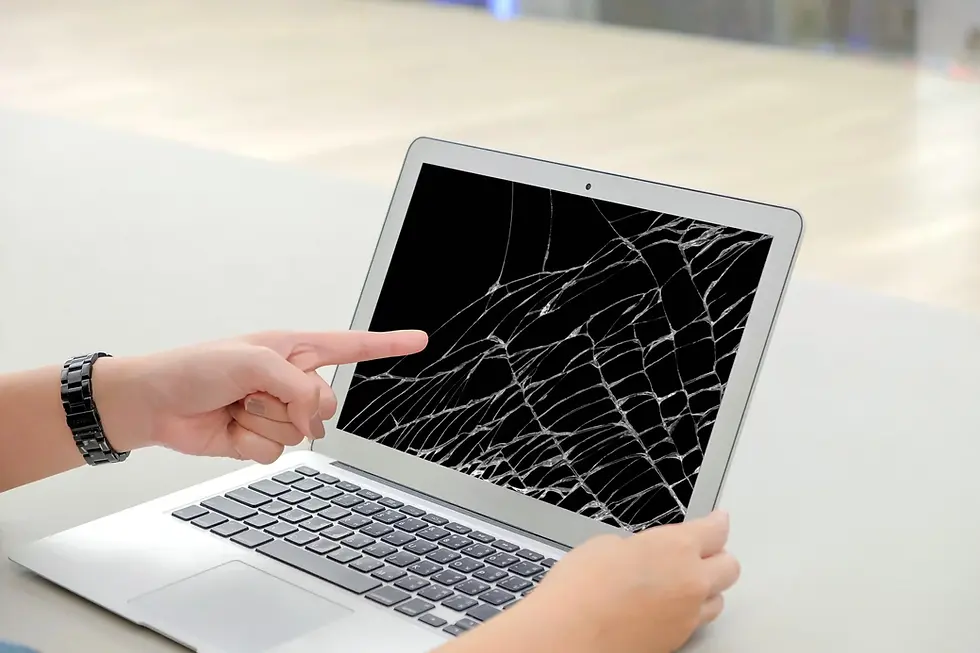
Finding a sudden crack or a flickering line across your display can be a heart-stopping moment for any laptop owner. Your device is often the hub of your professional and personal life, and a damaged display disrupts everything from productivity to relaxation. When faced with this issue, understanding the nuances of macbook screen repair becomes essential so you can decide whether to invest in a fix or consider a total replacement.
The decision often comes down to balancing the immediate cost against the long term value of your machine. At YKL Mac Fix, we see many users struggling with this dilemma, wondering if a repair will truly restore their vivid Retina display to its former glory. Navigating the world of technical repairs requires a bit of insight into what happens behind the scenes and what you should expect from a professional service provider.
Before we dive into the technical details, it is helpful to understand the how-to pick the best macbook repair in Malaysia to ensure your high-end hardware is in safe hands. Making an informed choice now can save you hundreds of pounds and hours of frustration later on.
Evaluating the Benefits of Macbook Screen Repair
Deciding to proceed with a macbook screen repair is often the most sustainable and cost effective path for owners of relatively modern models. Instead of the massive expense of buying a brand new machine and the hassle of migrating all your data, a targeted repair addresses the specific hardware failure. This approach allows you to extend the lifespan of a powerful computer that might otherwise be perfect in every other way.
Restoring Visual Integrity and Performance
The most immediate benefit is the restoration of your visual experience, which is crucial for creative professionals. Modern Mac displays use sophisticated technology that requires precise calibration to ensure colour accuracy and brightness levels remain consistent.
High quality replacement panels ensure that your colour reproduction remains accurate for photo and video editing tasks.
Professional installation prevents common issues like backlight bleed or uneven brightness distribution across the panel.
Genuine or high grade third party components maintain the structural integrity of the lid assembly.
Timely repairs prevent further damage to internal components that can occur when glass shards or pressure points affect the motherboard.
Expert technicians can identify if the issue is actually the display cable rather than the panel itself, potentially saving you money.
Environmental Impact and Sustainability
Choosing a macbook screen repair is a significantly greener choice than purchasing a new laptop. E-waste is a growing global concern, and by replacing only the damaged part, you are reducing the carbon footprint associated with manufacturing a whole new device. Many professional clinics like YKL Gadget Repair focus on component level fixes that align with a more sustainable tech lifecycle.
Understanding the Risks and Drawbacks
While there are many advantages, macbook screen repair does come with potential downsides that users should be aware of. The complexity of the assembly means that not all repairs are created equal, and the quality of the outcome depends heavily on the parts used and the skill of the technician. Understanding these risks helps you set realistic expectations for the final result.
Cost Considerations and Component Quality
The primary concern for most users is the price, as Apple displays are among the most expensive components in the laptop. If you opt for an excessively cheap repair, you might encounter issues that affect your daily usage.
Use of inferior LCD panels can result in lower peak brightness and poor viewing angles compared to the original.
Cheap glass replacements may lack the oleophobic coating that prevents fingerprints from smearing the screen.
Improperly sealed assemblies can allow dust or moisture to enter the space between the display and the backlight.
Incompatibility issues with True Tone technology can occur if the new screen is not properly programmed to the logic board.
Impact on Warranty and Future Reliability
A major consideration is how an independent macbook screen repair might affect your existing coverage. If your device is still under the original manufacturer warranty or an extended protection plan, seeking third party help might void those specific agreements. However, for those with older machines, the trade-off is often worth it to avoid the high prices at official service centres. It is always wise to check your current status on the official Apple Support site before making a final decision on where to take your device.
Navigating the Professional Repair Process
When you decide to move forward with a macbook screen repair, knowing what the process entails can give you peace of mind. A reputable repair centre will typically follow a structured diagnostic path to ensure they are fixing the root cause of the problem. This transparency is a hallmark of quality service and helps ensure that you aren't paying for unnecessary parts or labour.
Diagnostic Steps and Quality Assurance
A professional technician will start by testing the external video output to confirm the graphics chip is functioning correctly. This ensures the problem is definitely the screen and not a deeper motherboard issue. At YKL Mac Fix, we prioritise this thorough check to give customers an accurate quote from the beginning.
Examine the display housing for any dents or bends that might put pressure on a new glass panel.
Disconnect the battery to prevent any short circuits during the delicate disassembly of the display connectors.
Clean the internal fans and logic board area as a complimentary step to ensure the laptop runs cool.
Install the new display assembly and test all sensors, including the webcam and ambient light sensor.
Perform a final burn in test to ensure the screen remains stable under different heat loads and brightness levels.
Comparing Parts and Service Standards
There is a significant difference between replacing the entire "top clamshell" and replacing just the LCD panel inside the existing metal frame. While replacing the entire assembly is faster and often results in a factory-perfect look, replacing just the LCD is more technical and can be more affordable. For more details on these options, you can read about will image quality be affected after my mac screen repair to understand the visual differences.
Frequently Asked Questions
Here are common questions about macbook screen repair we often receive from our customers:
1. What is macbook screen repair and how does it work?
A macbook screen repair involves removing the damaged display assembly or the internal LCD panel and replacing it with a functional unit. The process requires specialised tools to open the chassis, disconnect high density cables, and sometimes use heat to soften adhesives. A technician then installs the new part and calibrates the display settings to ensure the hardware communicates correctly with the macOS software.
2. How long does a screen replacement usually take?
The timeframe for a macbook screen repair typically ranges from two to five business days depending on part availability. Some common models can even be repaired within twenty four hours if the stock is on hand. It is always best to check with your technician for a specific timeline based on your exact MacBook Pro or Air model.
3. Will I lose my data during the repair process?
In most cases, a macbook screen repair does not involve touching your SSD or hard drive, so your data remains safe. However, as a precaution, it is always recommended to perform a Time Machine backup before handing over your device. Professional shops will usually focus entirely on the display assembly without accessing your personal files.
4. Is it worth repairing an older MacBook screen?
Deciding if it is worth it depends on the overall health of your laptop. If the battery is still good and the performance meets your needs, a repair is usually much cheaper than a new machine. You can learn more about when other components might need attention by reading about when should i go for macbook battery replacement to see if a full overhaul is better for you.
5. Can I fix a cracked MacBook screen myself?
While DIY kits exist, macbook screen repair is highly complex and involves very fragile connectors and strong adhesives. Attempting this without the proper experience can lead to permanent damage to the motherboard or the webcam. Most users find that the safety and warranty offered by a professional service far outweigh the small savings of a DIY attempt.
Conclusion
Choosing the right path for your macbook screen repair involves a careful look at the age of your device and your specific budget. While a broken display is a major inconvenience, modern repair techniques mean that your laptop can almost always be restored to its original condition. By opting for a professional fix, you ensure that the high resolution and colour accuracy of your Mac remain intact for years to come.
The long term benefits of repairing rather than replacing are clear for both your wallet and the environment. Keeping a high performance machine in service for an extra three or four years provides excellent value and prevents unnecessary waste. When you work with experts who understand the delicate architecture of Apple products, you can feel confident that your investment is being protected.
If you are currently dealing with a damaged display, the team At YKL Mac Fix is ready to help restore your device to peak performance. We provide transparent pricing and expert care for all models of Apple laptops. Please feel free to Contact Us today to get a quote or to schedule a diagnostic appointment with our experienced technicians.


Comments